

Testing with Desk
Desk can spin up a local Kubernetes cluster with skew protection pre-configured. This is the easiest way to try out versioned deployments before going to production.
Desk ships two profiles that enable skew protection — they are alternatives, pick whichever fits:
| Profile | Runs ICC / Machinist / Workflow from | Use when |
|---|---|---|
oss | Released container images | You just want to try skew protection — no source checkout or build required. |
skew-protection | Local repositories with hot reload | You are developing or debugging ICC itself and want your local changes running live. |
Both profiles install Envoy Gateway as the Gateway API controller, create a Gateway resource, and enable skew protection. They use different testing timeouts, shown below. The rest of this guide works with either profile; substitute --profile oss or --profile skew-protection in the commands.
Prerequisites
Section titled “Prerequisites”Follow the Getting Started guide to install Desk and configure your environment (GitHub OAuth, .env file, /etc/hosts).
Then set up one of the two profiles below.
Option A — oss profile (released images)
Section titled “Option A — oss profile (released images)”No source checkout is needed. Desk pulls the released ICC, Machinist, and Workflow images, so this is the fastest way to get a working cluster. Start it with:
desk cluster up --profile ossOption B — skew-protection profile (local hot reload)
Section titled “Option B — skew-protection profile (local hot reload)”This profile runs ICC, Machinist, and Workflow with hot reload from local repositories (it extends Desk’s development profile). Clone the three repositories (all public) and point the matching Desk .env variable at each checkout:
| Variable | Clone URL |
|---|---|
ICC_REPO | https://github.com/platformatic/intelligent-command-center.git |
MACHINIST_REPO | https://github.com/platformatic/machinist.git |
WORKFLOW_REPO | https://github.com/platformatic/platformatic-world.git |
WORKFLOW_REPO must point to the platformatic-world monorepo root, not packages/workflow: Desk mounts the repo at /app and runs the workflow service from /app/packages/workflow.
Hot reload runs the local repos directly, and some ICC services (e.g. cluster-manager) require() compiled .js files that only exist as TypeScript in a fresh checkout. Build the ICC repo once before starting the cluster:
cd "$ICC_REPO"npm run build:devThen start the cluster:
desk cluster up --profile skew-protectionVerify the cluster
Section titled “Verify the cluster”Either profile creates a local k3d cluster with all the necessary components. Verify that the Gateway is programmed:
kubectl get gateway platformatic -n platformaticThe PROGRAMMED column must be True.
Profile settings
Section titled “Profile settings”Both profiles enable skew protection, but skew-protection leaves more time for
hot-reload development and manual inspection:
| Setting | oss | skew-protection | Production Default |
|---|---|---|---|
skew_protection.enable | true | true | false |
skew_protection.http_grace_period_ms | 30000 (30 sec) | 120000 (2 min) | 1800000 (30 min) |
skew_protection.http_max_alive_ms | 180000 (3 min) | 900000 (15 min) | 86400000 (24h) |
skew_protection.workflow_grace_period_ms | 300000 (5 min) | 300000 (5 min) | 3600000 (1h) |
skew_protection.workflow_max_alive_ms | 900000 (15 min) | 900000 (15 min) | 259200000 (72h) |
skew_protection.check_interval_ms | 10000 (10 sec) | 10000 (10 sec) | 60000 (1 min) |
skew_protection.traffic_window_ms | 30000 (30 sec) | 60000 (1 min) | 1800000 (30 min) |
skew_protection.cookie_max_age | 43200 (12h) | 43200 (12h) | 43200 (12h) |
skew_protection.auto_cleanup | false | false | false |
Deploy version 1
Section titled “Deploy version 1”Use the --version flag to deploy a versioned application. Desk automatically sets the correct app.kubernetes.io/name and plt.dev/version labels, and passes the same value to the image build as PLT_DEPLOYMENT_ID so the assets carry a matching ?dpl=:
desk deploy --dir ./my-app --version v1 --profile skew-protectionWait for the pod to be ready:
kubectl get pods -n platformatic -l app.kubernetes.io/name=my-appVerify that ICC created the HTTPRoute:
kubectl get httproute -n platformaticOpen your browser and navigate to https://svcs.gw.plt/my-app/. The skew-protection profile runs default_routing_mode: query, so there is no cookie to look for. Use the developer tools (Network tab) and check that the asset URLs carry ?dpl=v1 — those are baked into the build, and they are what pins this page to version 1.
Deploy version 2
Section titled “Deploy version 2”desk deploy --dir ./my-app --version v2 --profile skew-protectionWait for both pods to be running:
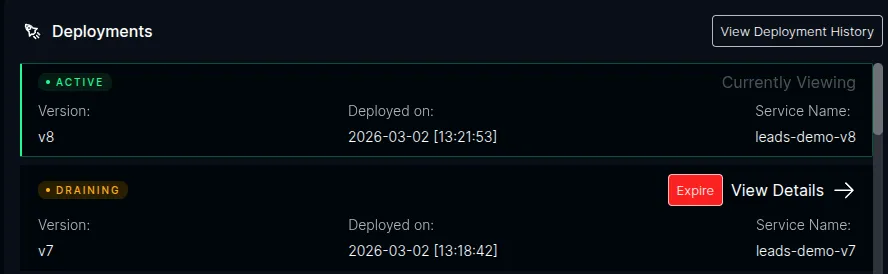
kubectl get pods -n platformatic -l app.kubernetes.io/name=my-appAfter ICC detects the new version, open the ICC dashboard at https://icc.plt/ and navigate to the Watt detail page for your application. The Deployments panel shows the version lifecycle in real time — the new version as Active and the previous version as Draining:
Verify routing
Section titled “Verify routing”A page already open — its assets keep requesting ?dpl=v1, so those requests continue to reach version 1 for as long as the page lives. You can confirm this in the Network tab. Note that this is per page load, not per browser: unlike cookie mode, a full reload is deliberately not sticky and re-pins to whatever is active.
A fresh navigation — reload the page, or open a new tab. It carries no ?dpl, so it is served by the active version, and the HTML it returns stamps every asset with ?dpl=v2. No incognito window is needed: with nothing stored client-side, an ordinary reload is already a new session.
Expiring a version
Section titled “Expiring a version”Draining HTTP versions are expired after the grace period when ICC observes two
consecutive zero-traffic checks, or when the max-alive ceiling is reached. With
the skew-protection profile used in the examples, the HTTP grace period is 2
minutes and max alive is 15 minutes. The oss profile uses 30 seconds and 3
minutes respectively.
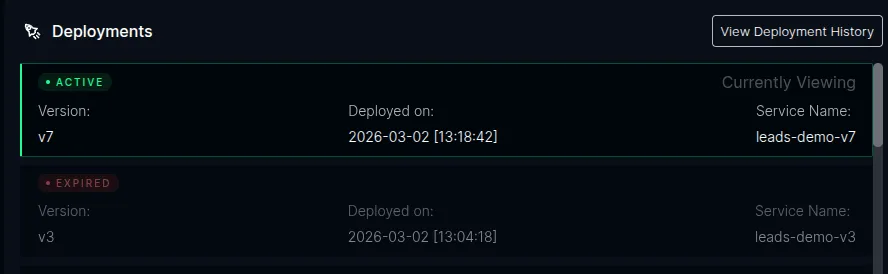
For demos and testing, you can also expire a version immediately by clicking the Expire button next to the draining version in the ICC dashboard. This skips the grace period and triggers the cleanup right away — the HTTPRoute rules for that version are removed and the Deployment is scaled to 0 replicas.
After expiration, the dashboard shows the version as Expired:
Once expired, a request still carrying ?dpl=v1 matches no rule and falls through to version 2 rather than erroring. A page left open across the expiry may 404 on individual assets, since version 2 does not have version 1’s content-hashed filenames; reloading fixes it.
Hostname routing
Section titled “Hostname routing”By default, Desk deploys apps under a path prefix on a shared hostname (https://svcs.gw.plt/<app-name>/). This works for most apps, but some frameworks — notably Next.js — make root-relative client-side fetch calls (e.g., fetch('/api/generate')) that break when the app is served under a sub-path.
The --hostname flag gives the app its own dedicated hostname with a root path prefix, matching how platforms like Vercel deploy apps:
desk deploy --dir ./my-app --version v1 --hostname my-app.plt --profile skew-protectionThis tells ICC to create an HTTPRoute with hostnames: ["my-app.plt"] and a / path prefix instead of hostnames: ["svcs.gw.plt"] with /<app-name>.
When to use --hostname
Section titled “When to use --hostname”| Scenario | Flag |
|---|---|
| App works fine under a sub-path | No flag needed (default path-prefix routing) |
| App makes root-relative API calls (e.g., Next.js) | --hostname my-app.plt |
| App expects to own its entire domain | --hostname my-app.plt |
/etc/hosts entry
Section titled “/etc/hosts entry”Add the hostname to your /etc/hosts file so it resolves to the local cluster:
echo "127.0.0.1 my-app.plt" | sudo tee -a /etc/hostsExample: versioned deploy with hostname
Section titled “Example: versioned deploy with hostname”# Deploy v1desk deploy --dir ./birthday-card-generator \ --profile skew-protection \ --version v1 \ --hostname birthday-card-generator.plt
# Deploy v2desk deploy --dir ./birthday-card-generator \ --profile skew-protection \ --version v2 \ --hostname birthday-card-generator.plt
# App is available at https://birthday-card-generator.plt/# API routes like /api/generate work correctlySkew protection works the same way — a fresh navigation is served by v2 and pinned to it by the ?dpl its assets carry, while pages already open on v1 keep reaching v1 until the version is expired.
Testing workflows
Section titled “Testing workflows”The skew-protection profile also enables the Workflow Service, so you can test versioned workflow deployments alongside HTTP skew protection.
Deploy a workflow app
Section titled “Deploy a workflow app”Workflow apps need the WORKFLOW_TARGET_WORLD environment variable in their Dockerfile. Desk auto-detects this and sets the plt.dev/workflow: "true" label automatically:
desk deploy --dir ./my-workflow-app \ --version v1 \ --hostname my-workflow-app.plt \ --profile skew-protectionAdd the hostname to /etc/hosts:
echo "127.0.0.1 my-workflow-app.plt" | sudo tee -a /etc/hostsTrigger a workflow
Section titled “Trigger a workflow”Open https://my-workflow-app.plt/ and trigger a workflow through your app’s UI or API. In the ICC dashboard at https://icc.plt/, navigate to your Watt’s detail page — the Workflows tab shows runs in real time with status, version, and duration.
Version-safe deployments
Section titled “Version-safe deployments”Deploy a new version while a workflow is running:
desk deploy --dir ./my-workflow-app \ --version v2 \ --hostname my-workflow-app.plt \ --profile skew-protectionThe in-flight run on v1 continues executing on v1 pods. Queue messages are routed by deployment version — v1 messages go to v1 pods, v2 messages go to v2 pods. You can verify this in the ICC dashboard:
- Open the Watt detail page — the Deployments panel shows v2 as Active and v1 as Draining
- Open the Workflows tab — the running v1 run still shows
Version: v1and continues to completion - Start a new workflow — it runs on v2
ICC expires v1 early only after its RPS is zero and the Workflow Service confirms there are no active runs, pending hooks, waiting sleeps, or queued messages for that version.
Replay on a draining version
Section titled “Replay on a draining version”You can replay a completed workflow even while its version is draining. In the run detail view, click Replay — the new run targets the original deployment version (v1), not the latest. This proves that draining versions remain fully functional for workflow traffic.
Inspect a run
Section titled “Inspect a run”Click any run in the Workflows tab to see:
- Trace — waterfall of every step with timing bars and parallel execution
- Graph — directed graph of the workflow structure
- Events — raw event log with expandable payloads
- Hooks — registered hooks/webhooks with status
- Streams — data written via
getWritable()
See the Workflows UI documentation for details.
Clean up
Section titled “Clean up”desk cluster down --profile skew-protection